Turning “Is it working?” into Who should I call?
Replacing email open rates with a signal LOs could actually act on.
An approved analytics dashboard told LOs their emails were getting opened. It didn't tell them who to call. I replaced open rates with Lead Status — a signal LOs could actually act on — and named leads converted at more than double the rate of a generic summary link.
- Product
- B2B2C platform for real estate + lending · Property Insights — Lead Status
- Scale
- 180K+ loan officers
- Outcome
- 77% opened a named lead within 1 hour · Dashboard shelved · Lead Status shipped
- Role
- Sole Product Designer
- Team
- Product Owner · Product Manager · Engineering
Confidentiality Notice: This case study has been anonymized. Visual details, content, and identifiers have been modified to protect confidential information while preserving the underlying design challenges and decisions.
01 — Problem
Activity isn’t an action
Property Insights already had a dashboard — a table of clients and the reports sent to them — and a weekly email that functioned as an activity feed: “John Doe viewed a listing at 1234 Maple Street,” “Sara Chen used the affordability calculator.”
Both told you what happened. Neither told an LO what to do.
Support heard the same complaint from the customer side: people opened emails that just restated their own activity back at them, with nothing to act on.
Leadership’s proposed fix had already been prototyped with AI and had cleared multiple approval gates: a polished analytics dashboard tracking email click-through and open rates.
It looked credible. But an open rate wasn't actionable for an LO. It could tell them how the email was performing, but not which customer needed their attention or what they should do next.
The dashboard was well-designed and measuring the wrong thing entirely.
02 — Role & contribution
Passing review isn’t the same as being right
By the time I looked at it, the CTR/open-rate dashboard had already made it past multiple approval gates.
The basic question hadn’t been asked: what does an LO actually do with these numbers?
I asked it, and the honest answer was nothing. It wasn’t tied to any action an LO could take.
I proposed replacing the analytics dashboard with Lead Status: which leads are worth a call?
The status could live in the two places LOs were already using — the weekly email and the existing client dashboard — rather than creating another dashboard to report on email engagement.
The idea met resistance for being simpler than what had already been approved. What settled it was pointing out that “already approved” and “actionable” weren’t the same thing. Every version we’d reviewed, including the one that had cleared the approval gates, still had no action attached to it.
Lead Status also gave us a faster, lower-cost path to the outcome we actually wanted. And it addressed a concern from Customer Success: adding more engagement data without a corresponding action would likely create more questions for CS without giving users anything new they could do.
"Already approved" and "actionable" aren’t the same thing.
03 — Outcome
Specificity beat the aggregate, by a wide margin
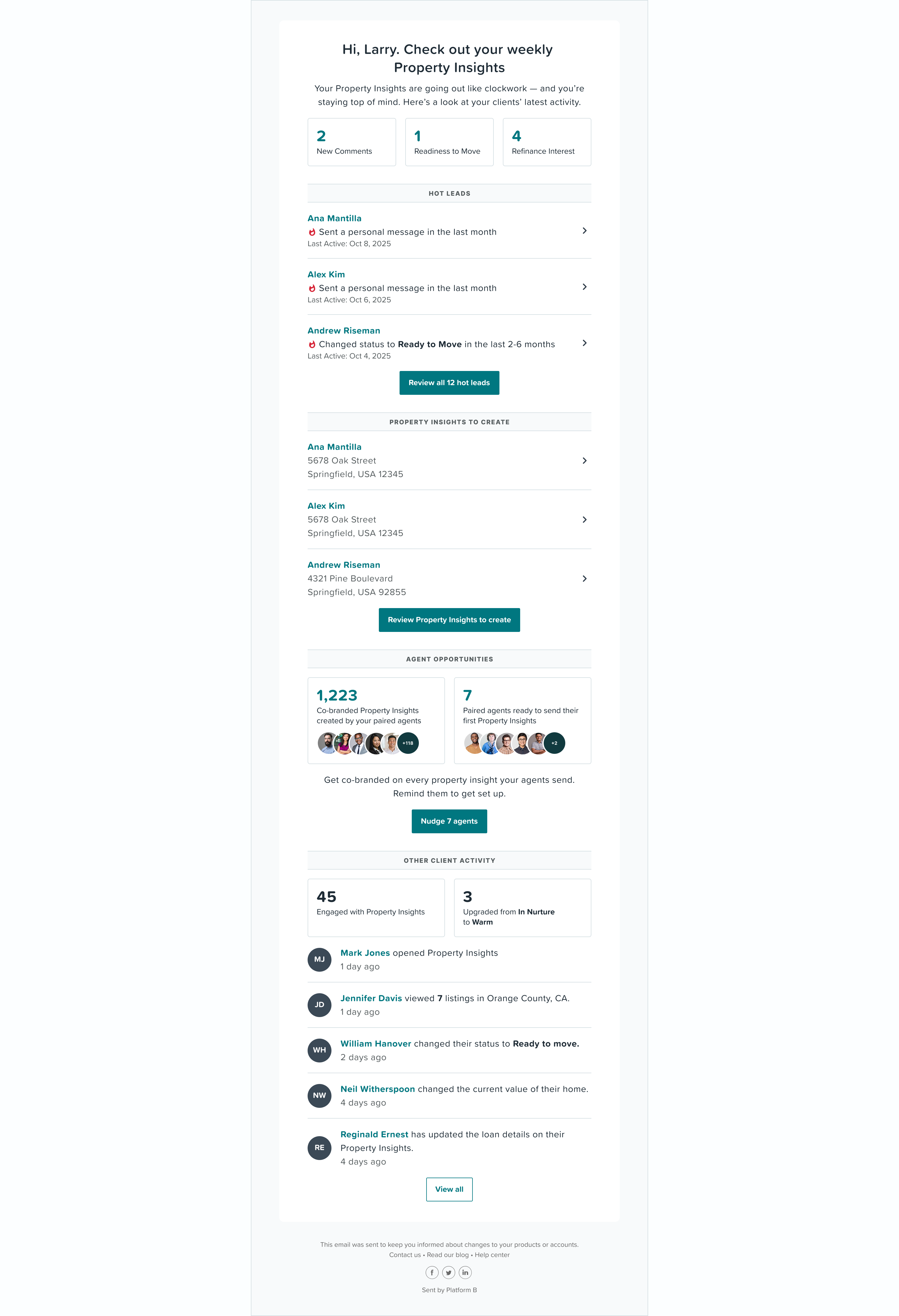
The redesigned email surfaced three named leads individually, with a “Review all hot leads” link at the bottom for everything else. Both were in front of the same recipients, in the same message, which made the comparison clean.
- The aggregate link: 604 unique clickers, but only 34% drilled into a specific lead within an hour, rising to just 48% after a full week. More than half never went beyond the summary.
- The three named leads: 77% opened the specific lead within an hour — more than double the aggregate rate, and in a fraction of the time.
Fig. 01 — Revised weekly email
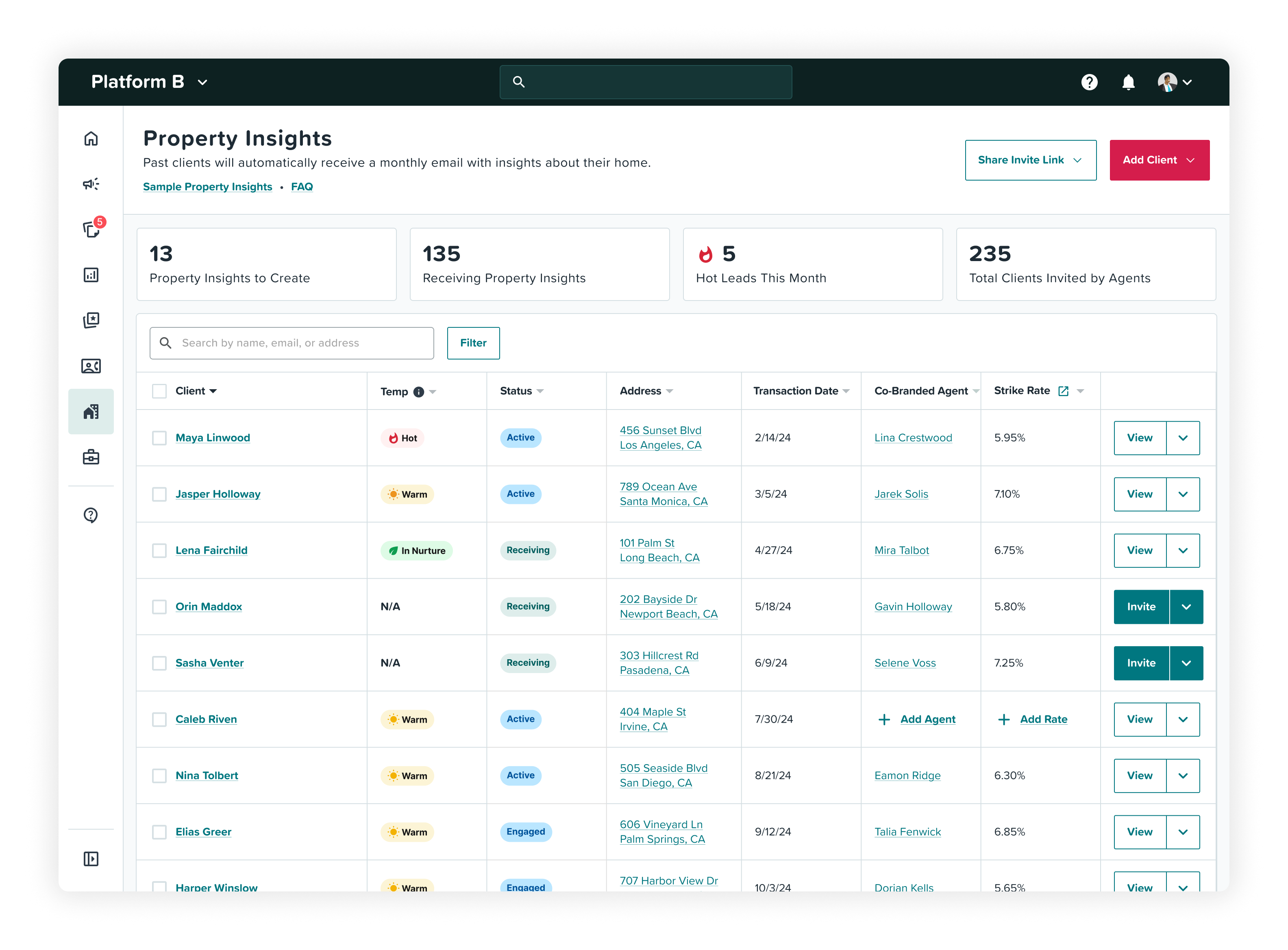
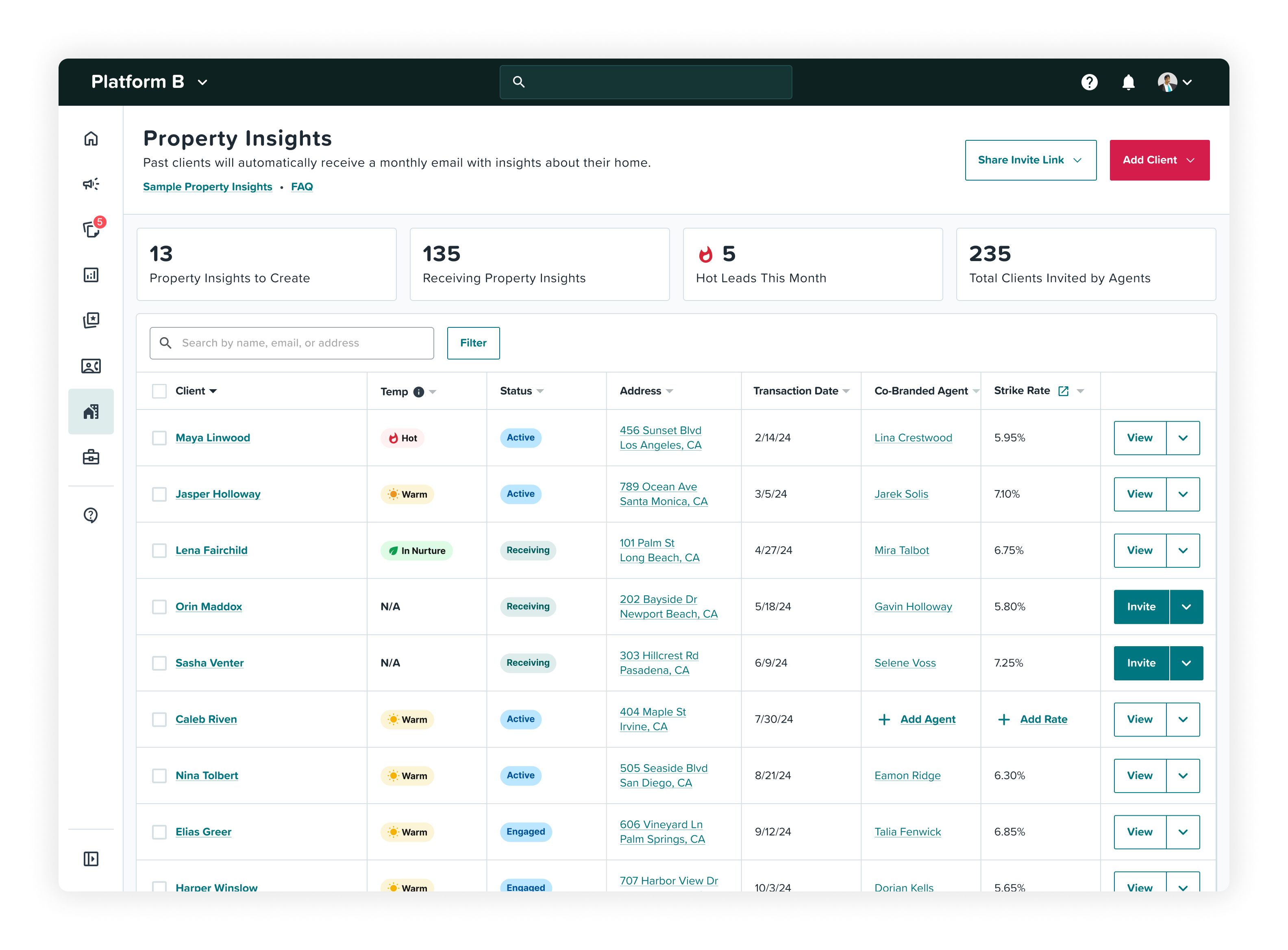
The proposed analytics dashboard was never built. Instead, we shipped Lead Status across the two surfaces LOs already used: named lead recommendations in the weekly email, and Hot / Warm / In Nurture status in the existing client table.
Fig. 02 — Lead Status UI
“I am ‘geeking’ out over Property Insights and the hot lead tool. It’s one of the best tools to stay top of mind with past clients..."
04 — Reflection
The decision is part of the product
This project reinforced a distinction I now look for early: a signal isn’t useful unless it changes what someone does.
We had treated reporting as a product in itself — measure engagement, surface the numbers, and let the user interpret them. But an LO wasn’t trying to understand engagement. They were trying to decide who needed their attention and what warranted a call.
Looking at the experience as a journey changed the question. Instead of asking, “How should we present this data?” I started asking, “What decision is this information supposed to help someone make?”
That distinction matters beyond this feature. A useful product experience doesn’t necessarily add more information or create a better surface. Sometimes the right move is to change where a signal enters the journey, how it is interpreted, or how directly it leads to action.
In this case, the answer wasn't better reporting. It was turning a signal into a decision.